
Download the FREE Art Page Checklist
Use this free resource to create the best artwork product pages that will convert visitors


Use this free resource to create the best artwork product pages that will convert visitors
You've found an artist you love. The print is beautiful. But your walls are a different story — and you're not confident it'll work in your space. That's where augmented reality changes everything.
Buying art online has always required a leap of faith. You fall in love with something on a screen, commit to it, wait for shipping, tear open the package — and then spend twenty minutes holding it up against your wall, hoping your gut feeling was right. Sometimes it is. Often enough that it isn't that you end up with a stack of beautiful things you never hang.
Augmented reality eliminates that leap. A growing number of online art and home decor stores now let you use your phone's camera to see any piece hanging on your actual wall, at actual size, before you buy. It's not a gimmick — it's become the most practical tool available to the modern art buyer, and the technology has matured dramatically over the past two years.
This guide covers how buyers are using AR to decorate their homes, which apps to look for, and what to expect from the experience.
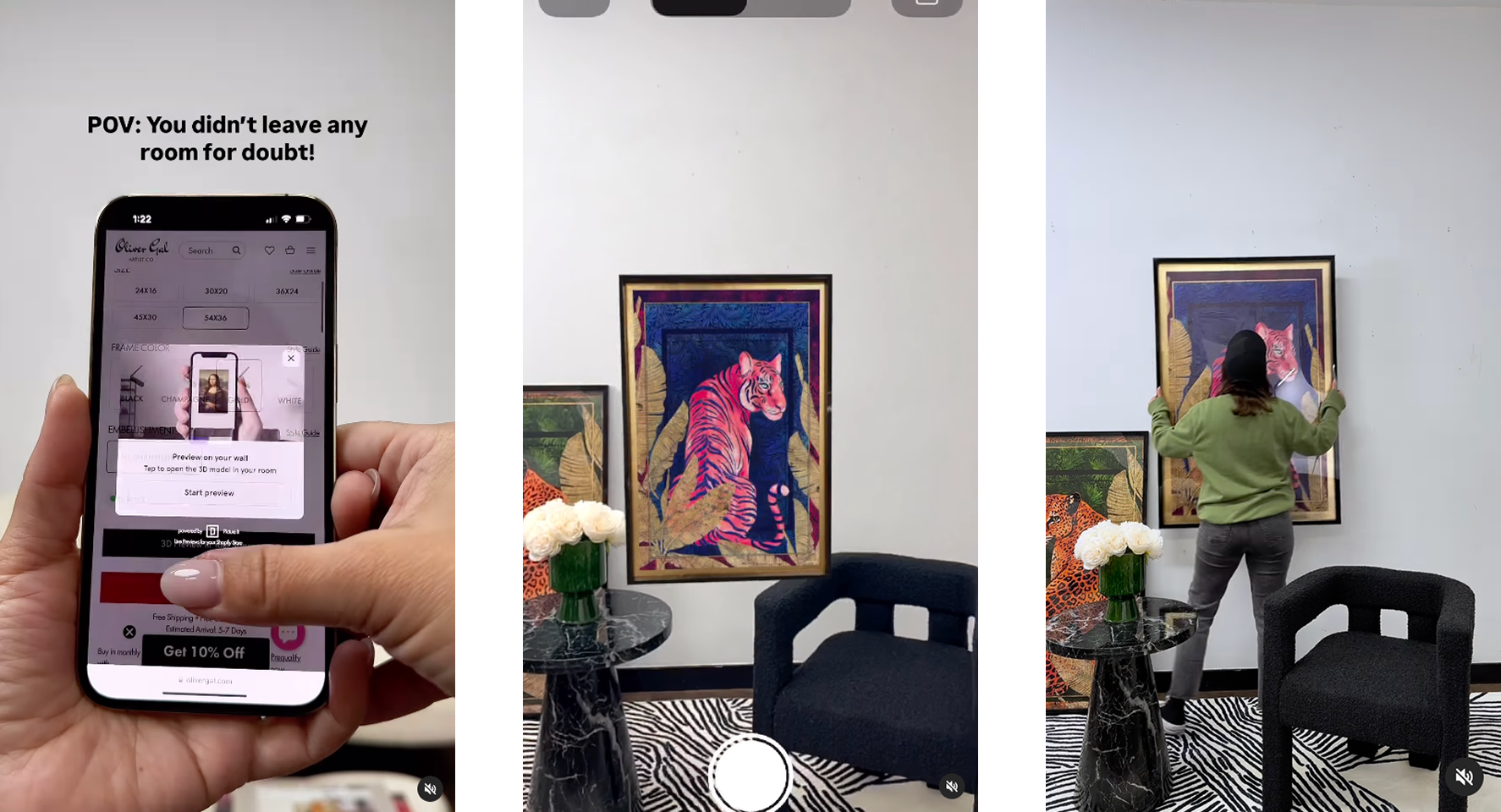
When a store has AR enabled on their product pages, you'll usually see a button labeled "View in Your Room," "See It On Your Wall," or sometimes just a camera icon on the product page. On mobile — which is how most people browse for art now — you tap it and your camera opens.
You point your camera at a flat wall. The app uses your phone's depth sensors and camera to detect the wall surface, which takes about one to two seconds. Then you tap to place the artwork. It appears on your wall, in the correct size based on the product's actual dimensions, and it stays there as you move around — you can step back, walk sideways, even step into another room and look through the doorway.
What you're seeing is exactly what would arrive at your door. Not a rendering in a staged showroom. Not an approximation. Your actual wall, with the actual piece on it.
The most common AR use. "Will this 24×36 print look too small above my sofa?" AR answers this immediately. You see it placed, at scale, in your actual room.
Art doesn't exist in isolation. Buyers use AR to see how a piece's colors interact with their existing furniture, rugs, and paint colors in real lighting.
More advanced buyers use AR to plan multi-piece gallery walls — placing several prints and testing compositions before buying any of them.
Buyers browse several stores, use AR in each, and use screen recordings to compare how different pieces look in the same spot before deciding.
Decorating decisions are often shared. AR lets buyers show partners and housemates exactly what a piece will look like — reducing the "I'm not sure about it" friction.
Home sellers and interior designers are using AR to quickly test how different art pieces transform a space before investing in physical staging.
💡 Buyer's Tip: When using wall AR, make sure your room has good, even lighting. AR surface detection works by reading depth and texture — it struggles in very dark rooms or when a wall has no visible features. Turn on your overhead lights for the best experience.
Not all AR is created equal. As an art buyer, the quality of a store's AR visualization directly affects how much you can trust what you're seeing before you buy. Here's what distinguishes a great AR experience from a mediocre one:
The most important factor. A good AR tool places your art at the exact dimensions listed on the product page. If a store uses an AR tool that doesn't account for actual product dimensions, what you see may be larger or smaller than what arrives. Look for AR experiences where you can confirm the size is accurate — many tools show the dimensions on screen during AR placement.
The best wall AR now works entirely in your mobile browser. No downloading a separate app, creating an account, or waiting for an install. You tap, your camera opens, and you see the art on your wall. If a store asks you to download an app to use AR, it's worth asking whether the friction is worth it.
Lower-quality AR may simply place art floating in 3D space in front of your camera, not actually attached to a wall surface. This is less useful for visualizing how a piece will actually look hung. Good wall AR detects the flat vertical surface of your wall and "places" the artwork flush against it, as if it were actually hanging there.

Link: https://apps.shopify.com/picture-it
★★★★★
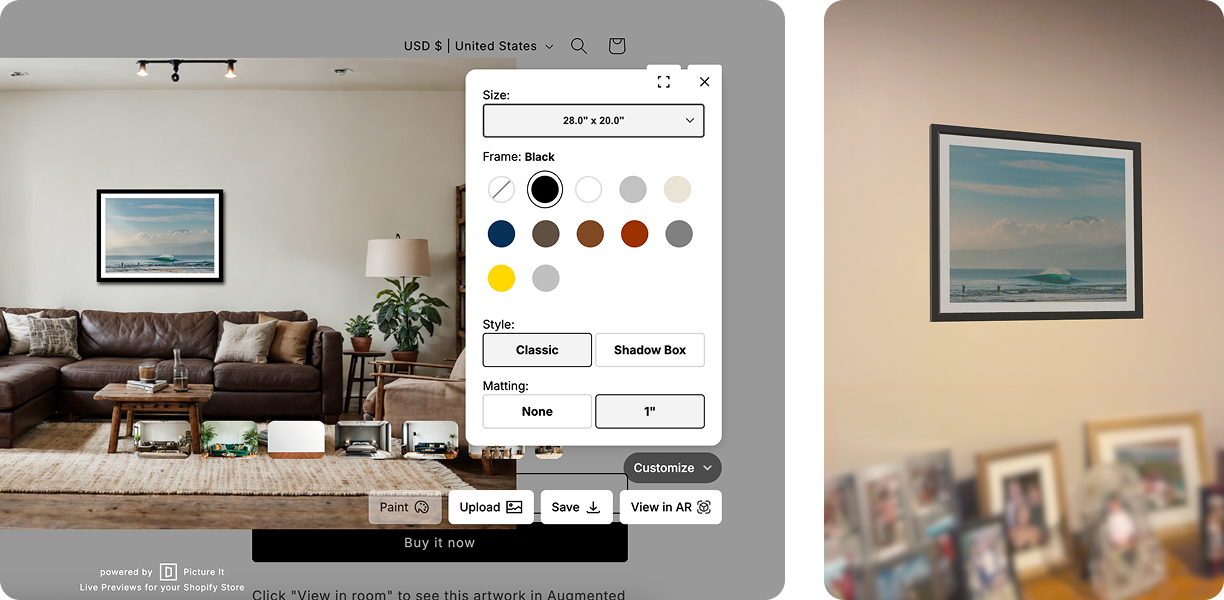
Picture It powers the AR on an increasing number of Shopify-based art and decor stores. When you tap "View in Your Room" on a store using Picture It, you get wall-surface-detected AR that places the art flush against your actual wall at exact dimensions. No app download, no friction. Works on iOS and Android.
As a buyer, the tell is in the accuracy: Picture It uses the actual product dimensions entered by the merchant, so the scale you see in AR is the scale that arrives at your door. It's the experience that makes the AR actually useful for purchase decisions rather than just impressive-looking.

Link: https://apps.apple.com/us/app/ikea/id1452164827
★★★★☆
IKEA's dedicated AR app remains one of the best consumer-facing augmented reality experiences in home decor. The 3D models are high-quality, the floor placement is accurate, and it covers IKEA's full catalog. The limitation is obvious: it only works for IKEA products. But as a benchmark for what good AR feels like, it's worth downloading just to calibrate your expectations.
For buyers using this app, the mental shift is significant. Once you've placed a BILLY bookcase in your living room in AR and realized it's taller than the gap between your baseboard and the ceiling, you understand why AR changes buying behavior.

Link: https://apps.apple.com/us/app/measure/id1383426740
★★★☆☆
Not an AR shopping tool per se, but worth mentioning: iPhone users can use the built-in Measure app to verify the dimensions of wall space before purchasing art. Measure your wall gap, note the dimensions, then cross-reference with product dimensions before buying. It's a workaround — but it's useful in the absence of product-level AR, and it costs nothing.
Gallery walls — curated arrangements of multiple art pieces — are one of the most-searched interior design topics. They're also one of the hardest to plan without seeing the pieces in your actual space. AR makes this possible in a way it never was before.
Use AR to place the largest piece you're considering — usually a landscape-oriented print or canvas — in the center of your intended wall space. This establishes your scale reference.
When you find a placement you like, screenshot it. Your phone's camera roll becomes your design planning board. You can share these screenshots with partners, designers, or friends for input.
Repeat the AR process for smaller pieces, using your screenshot as a mental reference for spacing. Some more advanced AR tools let you place multiple products simultaneously. With Picture It, you can quickly switch between sizes directly from the store's interface.
The power of AR is that "not sure" costs you nothing. Keep testing until the placement feels right. When it does, you'll know — and you'll buy with confidence.
Install Picture It for a 14-day free trial, cancel anytime.
